
Marking printer
Print markings with LEDs
Because the marking processes for components in industrial environments are becoming more important and the requirements are increasing, Phoenix Contact has developed two new marking printers based on UV LED printing technology.
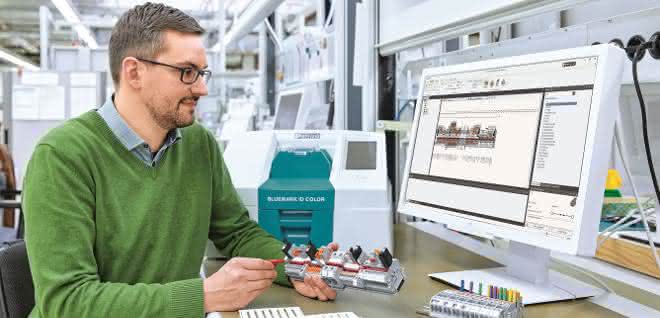
As diverse as the applications in the industrial environment are, the requirements that marking solutions have to meet are just as wide-ranging. Clear and durable marking of all components in switch cabinet and system construction is not only prescribed by the standard - for example in DIN EN 60204-1. Professional marking also ensures error-free installation and commissioning and minimizes downtimes during maintenance and faults.
Software ensures consistency
Increasing complexity and high cost pressure require ever more efficient processes in production, from planning to assembly. Integrated in-process solutions increase efficiency and reduce engineering and assembly costs. Today, complex projects in switch cabinet and plant engineering are largely carried out and managed using CAE systems.
As part of the value chain, planning and marking software such as Project Complete takes over the stored information on cables, wires, terminal points and markings at the click of a mouse. Manual data entry is not required and errors due to incorrect or redundant entries are avoided. A bidirectional interface allows data to be modified, added to and then written back into the CAE system.
The planning and marking software from Phoenix Contact automatically generates and visualizes two-dimensional representations of the terminal strips with precise positioning. An auto-correction function also automatically adds suitable accessories such as covers and end clamps to terminal strips that have already been planned. The system makes all relevant data - labeling data, parts, order and assembly lists - available to production at the click of a mouse.
Markings monochrome and in color
With the new Bluemark ID printer family, Phoenix Contact presents a universal solution for the industrial marking and coding market. The UV LED printing process produces high-quality and immediately usable markings. The process is characterized by environmentally friendly and emission-free operation. Two printing systems are available for different user profiles. In addition to the monochrome Bluemark ID printing system, the company also offers the Bluemark ID Color system with CMYK multicolor printing. Both systems have a variety of features that increase consistency and flexibility throughout the entire marking process.
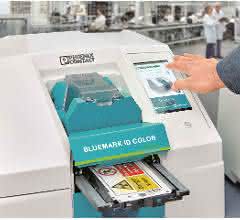
There is a wide range of industrial printing systems on the market. In order to produce labels efficiently and cost-effectively, the printing system used should always simplify the work. Both Bluemark ID printing systems have an intuitive user interface that supports the user throughout the entire printing process. The devices display all relevant information on the integrated 7-inch multicolor touch display: the fill level of the ink cartridges, videos on handling, operating and maintenance instructions as well as all technical specifications of the marking material.
Software on board and material selection
Both printing systems are controlled with the marking software and operated as stationary systems. Operation as a stand-alone system without the aid of an additional PC is also possible. In this case, fully integrated marking software supports the direct input of data via the touch display on the device. To simplify operation for larger marking projects, a mouse and keyboard can be connected via integrated interfaces. Projects that have already been created with the marking software can be transferred to the printing systems via USB stick.
With over 1,300 materials on eight different base materials for terminal, conductor, cable, device and system labeling, users have the right labeling material for every application. Complete product groups such as the UCT mats or the US cards with a labeling area of 104 x 140 mm have a material code. If the material type of the software does not match the inserted material, this is automatically detected and shown on the display. This prevents incorrect printing.
Using a scalable print image resolution, the user can choose between standard and HD printing; 300 or 600 dpi for the monochrome Bluemark ID and 1,200 or 2,400 dpi for the CMYK color printer Bluemark ID Color. This means that even very small fonts, 2D barcodes, logos or large warning notices can be printed in high quality.
Flexibility down to the last detail
Flexibility in material handling and feeding are other features that users expect today. On the one hand, comprehensive projects need to be processed quickly and efficiently by providing, automatically feeding and stacking the relevant printing materials in specially designed magazines on a project-specific basis. On the other hand, it is important to be able to react flexibly to special requests. In both cases, the Bluemark ID printing systems work with a variable material feed, which can be activated both in the marking software and directly on the printing system, depending on customer requirements. Magazines for either 20 or 40 UC/UCT marking mats are available for the automated material feed. Like the US cards, they can also be fed individually via the front feed.
Dipl.-Ing. Andreas Radeck, Product Marketing, Business Unit Marking and Installation, Phoenix Contact / am


You might also be interested in
Helu makes its first trade fair appearance under a new brand name
Helu Kabel will be presenting itself as Helu for the first time at Hannover Messe 2026, showcasing system solutions, Heluchain cables and new industrial luminaires.
 read more...
Strategic realignment with brand relaunch
In future, Helukabel will trade as Helu
The Helukabel Group is parting with part of its name: in future, the company will only operate under the Helu brand. With this step, the specialist for electrical connection technology is underlining its strategic development from a classic cable...
read more...Modular plant construction for corrugated board
Insight into the production of corrugators at BHS Corrugated: Automated, modular and equipped with Helukabel components.
read more...Best quality for the steel
Conditions in the steel industry are harsh and inhospitable. The machines used must be able to withstand the demanding environmental conditions in order to deliver the best quality at all times.
read more...If the standard cable is not sufficient
Lapp offers cables for countless applications - but not for all of them. From time to time, the developers have to modify a standard cable or develop a special cable.
read more...Slight decline in sales, strong investments
The Lapp Group has not been spared from the weakening global economy. However, the company only recorded a slight loss in the past 2024 financial year.
read more...Electrical connection technology
Cables and wires for industrial automation
Heukabel offers system solutions for cable routing from a single source. The subsidiary EKD Systems specializes in tailor-made cable drag chains made of steel, stainless steel and plastic, which are used in moving machines and systems as well as in...
read more...Lapp relies on Ultramid from BASF
Mobile charging of electric vehicles
The automotive industry is currently undergoing the biggest transformation in its history. The boom in battery electric vehicles in particular is presenting the industry with major challenges. Lapp, as a supplier of cables and connection...
read more...Cable handling application
At this year's Motek, ArtiMinds Robotics is showcasing a robot-based automation solution for the sensor-assisted assembly of flexible cables in connector housings.
read more...