
Item online configurator
Understanding linear technology
A tool for designing linear technology, including the appropriate drives and control units, offers additional added value by also teaching the basics of the technology and is therefore suitable as a training tool.
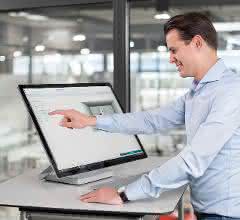
Which drive technology is the right one for my transportation task? How high should the repeat accuracy be and what does the travel profile look like? Automation systems usually have to meet complex requirements. These can be easily defined and fulfilled with item MotionDesigner. This is because the online software supports the selection and design of linear units. The tool imparts important specialist knowledge of linear technology and provides clear answers to fundamental questions. The methodical approach with logically sequenced steps makes the software easy to use, making it ideal as an introduction to linear technology and for training purposes.
item MotionDesigner is the digital selection and design tool for item linear technology. The intelligent software calculates the perfect combination of Linear Unit, motor and control unit from thousands of options, providing a complete solution that is optimally adapted to individual requirements. Necessary technical details and framework conditions are queried and analyzed. "Parameters that go beyond technical data are also stored, which have been determined in extensive calculations and measurements," says Uwe Schmitz, Product Manager Machine Automation at item. "Based on the expert knowledge, the software suggests the right solution within a very short time." During the selection and design process, item MotionDesigner teaches the general principles of linear and drive technology. The user learns which components with which dimensions are relevant for the automation solution and which details need to be defined. The software sets priorities and divides the configuration into individual areas.
Methodical approach and teaching the basics
For the optimal design of his automation solution, the user formulates his transport task simply and intuitively in dialog with the intelligent software. This guides him step by step through the successive areas - from the selection of the linear unit to the project documentation. The structured approach creates clarity and enables an intensive examination of individual key aspects of the design. Important basic knowledge is imparted almost incidentally. The user gains an insight into which drive type, motorization and controller as well as gearboxes and drive sets are suitable in order to find the right solution for the automation task. Additional information and definitions can be called up at numerous points where parameters need to be set or technical data recorded. For example, repeat accuracy and duty cycle are defined and the function and task of encoder systems are explained. General information and notes such as these give the user a deeper understanding of the subject matter and allow them to delve deeper into individual areas of linear technology.
Step by step to the result
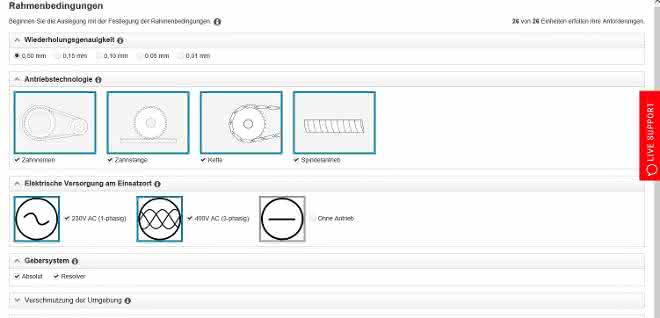
The item MotionDesigner guides the user through the configuration process like a red thread. At the beginning, the user decides whether they want to select a product or carry out a detailed configuration. In the first case, the user selects the desired motors, gearboxes and control units from a range of matching components after entering a few details. In the case of detailed configuration, on the other hand, the item MotionDesigner guides the user through all the configuration steps and asks for specific general conditions, installation position, load and carriage movement. The item MotionDesigner recommends the most suitable item linear motion unit. The result is the optimum combination of linear unit, drive and control unit. But how does the step-by-step design work? Once the user has decided on the detailed design, they can choose between a single linear unit, cantilever axis or synchronous axis. The general conditions are then defined. The intelligent software asks for the required repeat accuracy, the desired drive technology and the electrical supply at the place of use.
In addition, the user must provide information on the encoder system, the contamination of the environment and the technical parameters of service life and duty cycle. The next step is to define the installation position and alignment of the carriage. The user then defines the travel profile. The item MotionDesigner then provides recommendations for an item linear motion unit based on the specified motion and load profile and exact calculations. This is followed by the definition of the mounting position. Here, the user specifies the position of the drive components and the alignment of the gearbox and motor and specifies whether the control unit should be pre-parameterized. In the last section, the user has the option of specifying the desired basic components and selecting additional control accessories and necessary cables. If required, the program creates detailed project documentation, provides the CAD data and generates a configuration file for later transfer to the item MotionSoft commissioning software. In the next step, the shopping cart can be selected to order the configured products directly.
Configuration with maximum learning effect
The user benefits from the methodical approach to configuration and the numerous details and help functions in the tool. This provides them with important information to help them interpret data and facts correctly. Informative illustrations and graphics contribute to an understanding of the subject matter. If specific values are to be entered, the software limits the data range to ensure real data. For example, the stroke length must be between 0 and 5,820 mm. Such default settings also mean that incorrect data is a thing of the past. Oversizing the task is prevented and the risk of incorrect design is minimized. If individual parameters are changed, different scenarios are created within seconds. "Compared to item MotionDesigner, other commercially available systems take considerably longer to calculate after a value has been changed," says Uwe Schmitz. "Users tend to shy away from making changes, whereas with our software, testing, trying out and comparing is quick and easy." Created application examples and learning content can be saved and called up again as often as required.
Quickly create curricula and exercises
The item MotionDesigner is a free browser application. The user's IT system does not need to meet any special requirements to operate and use it. The intelligent selection and design tool is always up to date and can be used directly online without downloading. It can be easily integrated into webinars and video conferences. This allows participants to follow the individual steps in the configuration of linear units from any location. "item MotionDesigner is not just software that makes designing linear systems much easier and faster," says Uwe Schmitz. "The online tool is also perfect for training purposes."
For example, teachers and lecturers in training workshops, vocational schools or in-house training courses can make perfect use of the tool to teach the basics of linear technology. Curricula can be optimally aligned with the didactic structure, starting with the definition of the linear unit, through the general conditions and basic principles of technology and the description of individual components, to the accessories and final documentation in accordance with mechanical engineering guidelines. The direct practical relevance helps to deepen and consolidate teaching content. By using item MotionDesigner, the teacher does not need any additional materials to design the lesson, for example to explain the drive and guidance technologies or influence static and dynamic aspects. Students also benefit, as they can use the training tool at any time from home or other locations to deepen their knowledge.


You might also be interested in
Helu makes its first trade fair appearance under a new brand name
Helu Kabel will be presenting itself as Helu for the first time at Hannover Messe 2026, showcasing system solutions, Heluchain cables and new industrial luminaires.
 read more...
Strategic realignment with brand relaunch
In future, Helukabel will trade as Helu
The Helukabel Group is parting with part of its name: in future, the company will only operate under the Helu brand. With this step, the specialist for electrical connection technology is underlining its strategic development from a classic cable...
read more...Modular plant construction for corrugated board
Insight into the production of corrugators at BHS Corrugated: Automated, modular and equipped with Helukabel components.
read more...Best quality for the steel
Conditions in the steel industry are harsh and inhospitable. The machines used must be able to withstand the demanding environmental conditions in order to deliver the best quality at all times.
read more...If the standard cable is not sufficient
Lapp offers cables for countless applications - but not for all of them. From time to time, the developers have to modify a standard cable or develop a special cable.
read more...Slight decline in sales, strong investments
The Lapp Group has not been spared from the weakening global economy. However, the company only recorded a slight loss in the past 2024 financial year.
read more...Electrical connection technology
Cables and wires for industrial automation
Heukabel offers system solutions for cable routing from a single source. The subsidiary EKD Systems specializes in tailor-made cable drag chains made of steel, stainless steel and plastic, which are used in moving machines and systems as well as in...
read more...Lapp relies on Ultramid from BASF
Mobile charging of electric vehicles
The automotive industry is currently undergoing the biggest transformation in its history. The boom in battery electric vehicles in particular is presenting the industry with major challenges. Lapp, as a supplier of cables and connection...
read more...Cable handling application
At this year's Motek, ArtiMinds Robotics is showcasing a robot-based automation solution for the sensor-assisted assembly of flexible cables in connector housings.
read more...