
Multiphysics software
Comsol completes modeling and simulation environment
Comsol announces a major update to Comsol Multiphysics software version 6.0. The update extends the Model Manager Server with a web interface - an asset management system - that makes it easier for Comsol users and non-users alike to manage models, simulation apps and additional and supplementary files.
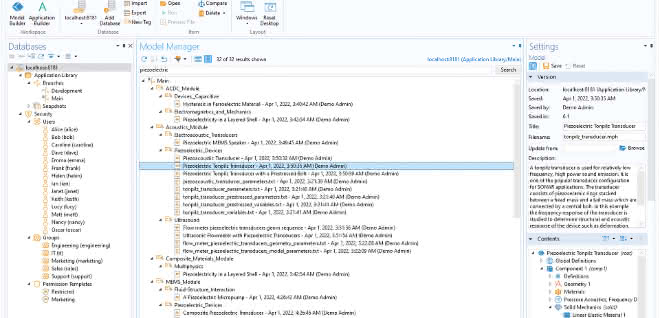
From model and app development to the management of simulation projects
In the two decades of its development, Comsol Multiphysics has evolved from a software for solving partial differential equations to a software that defines the essence of multiphysics modeling: using the Model Builder to create models with any combination of physical phenomena. As a result, engineers familiar with the underlying physics and model-building software began using Comsol Multiphysics for modeling and simulation in technology-oriented industries, universities and research institutions. In the next step, Comsol introduced the Application Builder and the concept of simulation apps to make simulation accessible to those who were previously unable to work with models and simulations.
Today, Comsol completes the environment for managing modeling and simulation projects for product and process design with the recently introduced Model Manager and Model Manager Server with its associated asset management system.
About the Model Manager Server and its Asset Management System
The Model Manager was published and enabled in December 2021:
- Search models for specific parameter names and characteristics
- Track model development through version control with functions for comparing and merging models
- Upload, link and manage additional and supplementary files for a modeling and simulation or development project
The Model Manager has now been supplemented by the Model Manager Server's asset management system, which is accessible via a web interface. In it, an asset can be viewed as a repository for links to your model versions, attached supplementary and additional files, and various custom metadata fields. With the asset management system, you can break down assets by model and app files, add abstracts, set permissions and even insert thumbnail images of each model.
"As an extension of the Comsol Multiphysics simulation platform, the Model Manager Server asset management system is useful for the administration and management of your models, apps and simulations in your corporate network environment, set up as you wish," says Phil Kinnane, Senior VP of Sales. "This can be project-based, model-based, team-based or the like, depending on how you want to structure and organize this work in your organization."
A collaborative environment that encompasses all areas of an organization
The Model Manager Server is a database system that can be managed either via the Comsol Desktop or a web-based user interface. A local installation of any license type of Comsol Multiphysics with the Model Manager and a local database is typically the first step for a modeling engineer to familiarize themselves with how best to use this system in their organization. From there, full deployment can be accomplished by installing the Model Manager Server on a central server. Local installations of Comsol Multiphysics can connect to the central server via the Model Manager Server. "I think companies will start to transfer the hundreds of Comsol models they have developed over the years into their asset management systems as a common model library," adds Kinnane. "Instead of having to go through the many engineers using the software for different purposes, they can now find and search the models in one centralized repository."
The full power of the Model Manager Server
Ed Fontes, CTO of Comsol, describes how the Model Manager Server will take an organization's simulation-driven projects to the next level: "The real power of Model Manager lies not only in its ability to manage your simulation data, but also in its ability to version control and audit your actual model creation process." He adds: "There are a number of systems out there for managing simulation data, but Comsol has focused Model Manager on the process of model creation, such as easily browsing the model tree of specific models or searching for specific features such as domain settings, boundary conditions or study types to revise, update or even reuse."
Internal or external customers can use the database system to track and use the results of a project. They can also use simulation apps and provide feedback on their measurement and test data by uploading them and reports to the corresponding asset. And, of course, contributors to model development can also add their additional data, such as CAD files and specifications, to the project. "All in all," says Fontes, "the Model Manager Server and the Asset Management System really provide the complete working environment for modeling and simulation projects."


You might also be interested in
A quantum computer that performs calculations using oscillations
When it comes to storing information, quantum computers have so far run up against technical limitations. Instead of electromagnetic storage, researchers are now using mechanical vibrations. Their vibrating memory can store significantly more...
 read more...
Hydrogen Pipelines Put to the Test
New real-world lab tests safety and resilience
The Federal Institute for Materials Research and Testing (BAM) is opening a real-world laboratory to study pipelines and components for the safe operation of future hydrogen networks.
read more...Research Platform for the Energy Supply of the Future
For the first time, the Karlsruhe Institute of Technology (KIT) is bringing together key hydrogen technologies in a single research environment. The facility is intended to demonstrate how the production, storage, transport, and use of hydrogen can...
read more...When the quantum computer arrives
The Research Race to Ensure the Security of Critical Infrastructure
How can we protect our critical infrastructure from attacks by quantum computers in the future? As part of the QUEST project, Darmstadt University of Applied Sciences is researching new methods—post-quantum cryptography—designed to withstand even...
read more...VDE study on electrical engineering
More retirements than graduations
According to a VDE analysis, more than 30,000 electrical engineers will retire by 2029 without enough graduates to replace them. This is due to falling student numbers and high drop-out rates.
read more...Giving lightweight construction a profile
Pultrusion: A process that forms fibers under tension
Pultrusion is developing from a niche process into a key process for lightweight construction and sustainable fiber composite structures. The Fraunhofer IWU shows applications from energy to mobility.
read more...Green hydrogen directly from the sun and water
A start-up project at the Karlsruhe Institute of Technology (KIT) aims to fundamentally simplify the production of green hydrogen: Mass-produced photoreactor panels are to be used to produce hydrogen directly from sunlight and water - without...
read more...Fraunhofer shows industrial future between AI, data and new materials
At Hannover Messe 2026, the Fraunhofer-Gesellschaft will be presenting solutions for a resilient industry: from AI and data rooms to hydrogen technologies and material and recycling innovations.
read more...The bottleneck is in the system
Is the transformation of the industry failing due to "German Angst"?
A recent ISF study examines what is slowing down change in German industrial companies. According to the results of the study, the causes of innovation bottlenecks often lie in internal structures and a lack of strategic orientation.
read more...