

CAD/CAM
New features for mill-turning and mold making
Version 2021.1 of the CAD/CAM suite Hyper-Mill offers new functions for higher-quality surfaces in tool and mold making.
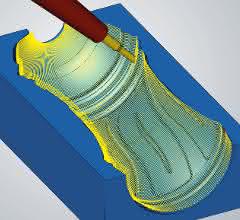
Simpler programming and the best surfaces at the same time - this is what the 5-axis radial machining function offers. With this new strategy, tool paths such as for bottle shapes can be calculated much faster using a radial projection method. Each step can be clocked with an indexed approach per cut to achieve the best possible surface quality. In transition areas, the standard integrated strategies "High-precision surface mode" for precise surfaces in the micrometer range and "Gentle overlap" are also available.
Best possible surfaces
Gentle overlapping" also perfects the new XY optimization function in 3D profile finishing: If an area cannot be optimally machined in X-alignment, for example on a steep wall, it is automatically machined in Y-alignment to maintain a constant infeed. Thanks to the optimized grinding in the overlap area, the change in machining direction is not visible on the workpiece.
Edit toolpaths interactively
In Hyper-Mill 2021.1, OPEN MIND offers a new and intuitive way to subsequently edit toolpaths. In the interactive "Edit toolpath" mode, existing toolpaths at selected points and curves or complete toolpath sequences between two G0 movements can be selected and removed with great flexibility.
In the optional mill-turn module, the high-performance mode has been integrated into the 3-axis simultaneous roughing. This makes it easy to use high-performance toolpaths with optimized approach and departure movements during simultaneous turning. Simultaneous roughing is extended with the advantages of HPC turning at the touch of a button, thus combining both technologies.
CAD software
The integrated CAD software Hyper-CAD-S offers a new "best-fit alignment" function that optimally aligns the CAD model of the workpiece with the mesh model of the blank. CAD model data can be aligned using defined pairs of points. An algorithm automatically calculates the best possible alignment. The user can use various parameters to control exactly how the alignment should look. Displacement and rotation axes can be locked and a weighting between the individual point pairs can be defined. This allows, for example, meshes of raw parts or welding areas to be aligned optimally and quickly in relation to the actual CAD model.


You might also be interested in
New Trade Show for the Turned Parts Industry
The Association of the German Turned Parts Industry has given a positive assessment of the first Make-to-Order (MTO) Days: With 184 exhibitors and approximately 1,400 trade visitors, the inaugural event proved to be a successful platform for...
 read more...
In-house exhibition Bielefeld 2026
How DMG Mori thinks about the factory of the future
DMG Mori will be showcasing turning and milling expertise, automation solutions and additive manufacturing along the Machining Transformation (MX) at the Bielefeld 2026 in-house exhibition.
read more...Association of the German Turned Parts...
Turned parts industry looks cautiously to the future
Rising order intake, new members, cautious optimism: the members of the Association of the German Turned Parts Industry are confident. At the spring conference in Leipzig, around 150 participants discussed current market developments, strategic...
read more...World premieres at the EMO 2025
From September 22 to 26, 2025, Grob will be presenting several innovations at EMO Hannover. The focus of the trade fair appearance will be on the latest 4- and 5-axis universal machining centers and the associated automation solutions.
read more...Efficient complete machining
Index-Werke will be bringing the Index G220 turn-mill center and the Traub TNA400 universal lathe to Intec.
read more...Digitization of process chains
CAM system Hypermill in practice
At EMO 2023, Open Mind will focus on turning, milling and the importance of CAM software and MES in networked production environments.
read more...High-speed spindle in handbag format
Modules for milling and turning
At Weiss, the focus is on the new 1.5 kilogram micro-mill spindle, which rotates at up to 60,000 revolutions per minute.
read more...Handling and workpiece clamping
Networked production starts with the component
Schunk is coming to Hanover with a 360-degree portfolio covering all aspects of machine tools. The focus will be on more sustainable production, connectivity and e-mobility.
read more...Stroll through the city
DMG Mori is inviting visitors to take a stroll through the city at EMO: In a specially constructed DMG Mori City, the machine tool manufacturer is concentrating on its focus topic of Machining Transformation (MX).
read more...