
Engineering
Item revises its online tools
Item is expanding its engineering tool, with new components and options offering users more design and configuration options. The motion designer and the Motionsoft commissioning software have also been updated.
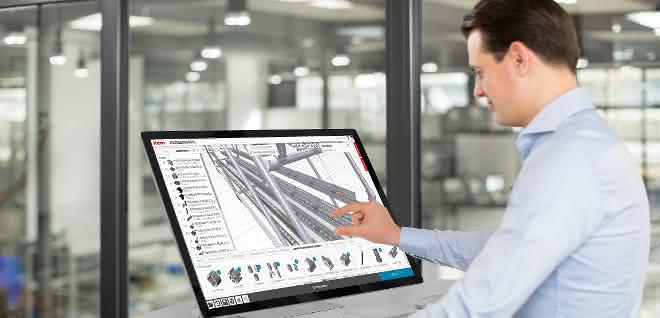
Using the new "Measure clear width" function, the engineering tool directly determines the distance between parallel profiles. Whether for round or square profiles, the measurement is automatically based on the distance between the outer edges of the profile (internal clearance). The values are updated immediately as soon as profiles are moved or dimensions change. By specifying the usable dimensions, users are able to precisely adhere to the required dimensions and gaps in shelves or machine frames. The engineering tool provides detailed project documentation, easy-to-understand assembly instructions and the required CAD data for all processing variants.
The roller conveyor 6 40x40 Al is now available to users of the tool for the stable construction of racks and FIFO shelves. The new component is extremely versatile. There is a choice of different rollers and an optional aluminum guide rail, which additionally increases the bending stiffness.
Users benefit from revised software
Motiondesigner determines the optimum combination of individual components for a ready-to-install automation solution. In the new version, the software can also be used when motors and gearboxes from other manufacturers are used. Universal drive sets are stored in Motiondesigner for this purpose. The program specifies the required drive power and provides additional data that enables connection to the existing drive technology and control system.
Users can use the "Live Support" function to contact item customer advisors directly during normal business hours for technical support with the design of their Linear Units.
The market leader in modular systems for industrial applications has also updated its Motionsoft commissioning software. The new version simplifies and speeds up the programming of the path program. Context menus and detailed graphics make operation easier and improve the overview of individual steps in the program. Additions and changes can be made conveniently via drag-and-drop. as


You might also be interested in
Electromechanical spindle drives made to measure
Stabilus now also offers "Industrial Powerise Actuators" of type IPR40 as a customer-specific solution from batch size 1. Design engineers can individually configure forces, stroke lengths and speeds.
 read more...
Motors, gearboxes and encoders: Faulhaber expands Ø 16 mm portfolio
Faulhaber is expanding its portfolio with new DC motors from the SXR and GXR family, a 16 mm planetary gearbox and the IEX3 magnetic encoder for compact drive solutions.
read more...Gear technology for angular gearboxes
Customized gearing solutions for high-performance drives
Framo Morat presents the "speeroX gearing", a concept for high-ratio angular gears. The article explains the structure, functional principle, fields of application and material options of the technology.
read more...Low-noise gearbox models from Faulhaber
Faulhaber is expanding the GPT family with two high-performance models that impress with their whisper-quiet operation: the "22GPT LN" and the "32GPT LN".
read more...Compact printed matter
Producing complexly shaped bodies of consistent quality from ceramic bodies is a science. A special machine manufacturer produces high-performance extruders for this purpose. The company is now using new, space-saving planetary gear units from...
read more...Automation and industrial robotics
Customized gearbox solutions
At Automatica, SPN Schwaben Präzision will be showcasing various gearbox solutions from the fields of robotics and automation.
read more...Drive technology 2025
Drive technology is the heart of every production process. Nothing moves without it, and no machine can do without drive technology components. From frequency converters, electric motors and gearboxes to clutches and brakes. Who offers which...
read more...New drive solutions for industrial automation and robotics
Faulhaber presents drive solutions with the new GXR and SXR motor family, which offer high efficiency and flexibility in combination with powerful gearboxes and encoders. These optimized components open up new possibilities for applications in...
read more...Drive technology 2024
Drive technology is the heart of every production process. Nothing moves without it, and no machine can do without drive technology components. From frequency inverters, electric motors and gearboxes to clutches and brakes. Who offers which...
read more...