
Yaskawa
Simulator for inverters
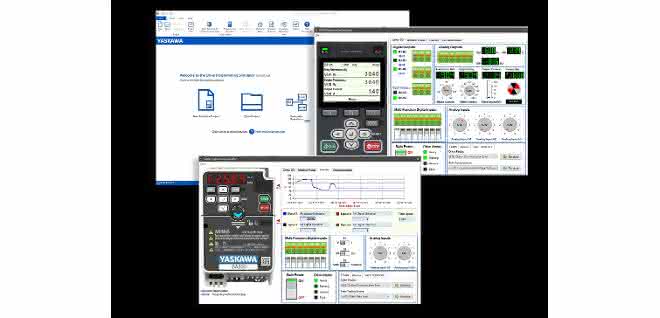
How will the inverter behave in real operation? Which sequences must be run in the application and which inverter type is suitable? What happens in the event of an overload? With the GA500 and GA700 inverters from Yaskawa, such questions can be easily answered in advance using the "Drive Programming Simulator".
The tool offers a realistic simulation of all frequency inverters in both series, from the display and buttons to the I/O terminals. The virtual inverter can be programmed and operated in exactly the same way as its real counterpart using the keypad on the screen. It is controlled via the virtual input terminals, starts and stops can be set and set input functions can be activated.
The reaction can be read directly from the virtual output terminals and saved if required. Alarms and faults such as overload or similar can also be simulated. The settings can then simply be adopted for real inverters. The DriveWizard control software on a PC or smartphone reads the data and transfers it to the device. as


You might also be interested in
Everything accurate in switch cabinet construction
To ensure smooth work processes, tools for processing enclosures and housings must function flawlessly and reliably. Häwa rounds off its punching range with the Multi-Press 500.
 read more...
Fast connection
In addition to the XTV terminal blocks with side conductor routing, the first terminal blocks with front Push-X connection are now also available from Phoenix Contact.
read more...Automate without control cabinets
Beckhoff wants to revolutionize the market with the MX modular automation system. Andrea Gillhuber spoke to Product Manager Daniel Siegenbrink about the possibilities that the system offers users, what experiences have already been made and where...
read more...Simply assemble cobots
Grip Handhabungstechnik focused primarily on aesthetics when designing its new cobot tables. However, functional and ergonomic aspects also played a major role in creating a perfect working environment for the operation of lightweight robots.
read more...3D printing drone supports fire department in operations
Every day, firefighters risk their lives in unknown environments. With the help of 3D-printed parts, David Häusermann and his team at Empa have spent six months developing and testing a heat-resistant reconnaissance drone. The "fire drone" is...
read more...Wago platform for 3D printing ideas celebrates its birthday
3D printing is in vogue. This is also demonstrated by the digital think tank and 3D printing community Wago Creators. It is celebrating its second birthday this year. Since then, the online community has grown to almost 4,000 users - time for a look...
read more...More efficiency in the control cabinet
clipx Engineer, the engineering software from Phoenix Contact, is the software for control cabinet construction that optimizes data consistency from the circuit diagram to the control cabinet.
read more...Printing and appliqué in one step
Good legibility and permanent marking are of the utmost importance for industrial marking. At the same time, it is considered time-consuming and laborious to assemble the individual markers, especially when many conductors and cables need to be...
read more...Resource-saving plastics processing
Efficient all the way to the cloud
PC-based control, the PC- and Ethercat-based control and drive technology from Beckhoff, offers the potential to make machines and systems for the plastics processing industry work more sustainably.
read more...