
Connected Machining
Control systems network production
Heidenhain's Connected Machining software solutions enable production in which all work steps are networked with each other, from design to the finished component ready for delivery. They give TNC controls access to all order-related data in the company network, so that the specialist becomes the controller in the process chain.
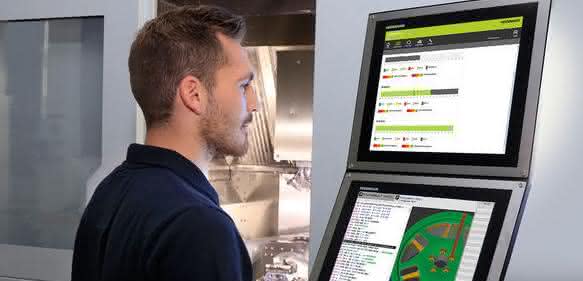
Design in the CAD system, programming and preparation of production data in the CAM system, simulation of machining on a virtual machine, tool provision, tool measurement, tool management - all of this has long been available in modern production. However, smooth data exchange between all the people and systems involved is by no means a matter of course. A lot of manual work is still the order of the day here - in the best case a manually initiated data transfer, in the worst case the passing on of a handwritten note.
The workpiece is created at the machine. This is where all the information must come together. And this is also where crucial information about the status and quality of a workpiece must flow back into the production IT systems - i.e. into the process chain. The skilled worker responsible for component quality and adherence to deadlines must have access to all data and must be able to reflect his experience from production back into the process chain.
There are many ideas for networking all the people and systems involved in the process. But making the machine control in the workshop the linchpin in the company network has a very special charm under the conditions described. This was demonstrated, among other things, by a live demonstration that Heidenhain realized together with partners from the fields of CAD/CAM, machine tools, tool measurement and tool management on the topic of networked manufacturing at EMO 2017.
The pallet on the machine contains the clamped blanks for the upcoming machining process. Already measured tools are inserted in the machine's tool magazine. They are clearly identified by a code on the tool holder. When loading the tool magazine, the user has read in this code via a scanner. In this case, the TNC 640 from Heidenhain therefore knows which tools are present in the machine. The data for this comes directly from the tool management system via the Heidenhain DNC interface.
The user can access the CAM system directly from the TNC 640 control via the Remote Desktop Manager. The CAM system in turn accesses the tool database for program creation. The user can now schedule the execution of the production order on the machine via the TNC's Batch Process Manager. In the Batch Process Manager, NC programs and the position of the workpiece clamping on the pallet are linked order-related and sorted according to priority in the list of open orders.
Real-time view of the machine status
The Batch Process Manager allows the TNC user to plan several production orders in parallel with machining time. The control supports the user by comparing the tools used in the NC program with those actually available on the machine. It then provides feedback on any missing tools and the expected machining time. For example, the user can output a tool difference list that only contains the tools that still need to be set up.
The information on the expected machining time can also be used for further order planning, for example to plan future logistics for the manufactured components or follow-up orders for the machine. Together with the information from tool management, it is also used to reorder new tools. The new StateMonitor software supports the TNC user in this process. StateMonitor records the data from connected machines, provides a real-time view of the machine status and can send messages to computers throughout the company and to mobile devices. The program also uses the DNC interface for this purpose.
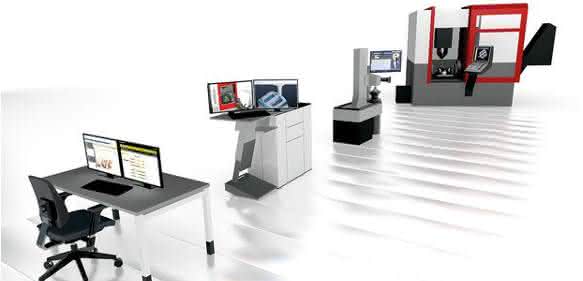
In tool provision, requirements for any additional tools that may be needed arise immediately. This also applies to ongoing series production. The software can send a message to tool provision if the tool life of a tool reaches a critical value and this is detected in the NC program. In tool provision, new tools can be provided and calibrated immediately on the presetting device using the data stored in the tool management. In this case too, the data for the specific tool setting is fed back into the tool management system. The preset tools are in turn given a code on the tool holder for unique identification. The CAM program and virtual machine then have access to this data again.
A final automatic workpiece measurement on the machine provides important data for quality assurance. They can be archived or evaluated there. They are also available centrally for all other systems, so that all links in the process chain, from the NC program to the tools, can be optimized.
Connection to individual conditions
The core elements of Connected Machining are the DNC interface, the Remote Desktop Manager and the StateMonitor software. DNC establishes the connection to ERP and control center systems and integrates the StateMonitor software into a company network. The Remote Desktop Manager provides access to all Windows applications. In addition, the TNC controls already include numerous useful functions for working with data as standard, such as viewers for PDF, image and CAD files in Step or Iges format as well as a web browser. Connecting the control to the company network then only requires an Ethernet connection.
Connected Machining solutions are universally adaptable to the individual circumstances of each production facility so that every company can design its process chain according to its own wishes and requirements. The various functions and software solutions then network these into a process chain with an end-to-end digital information flow, regardless of the solution selected. The aim is to provide customers with the greatest possible flexibility. They can adapt, configure and use the Heidenhain solutions themselves. am


You might also be interested in
Robotics and autonomous order picking
Locus Robotics acquires Nexera Robotics and expands autonomous warehouse logistics
Locus Robotics takes over Nexera Robotics and may have taken a decisive step towards truly universal warehouse automation. A new gripping technology should now make possible what was previously considered difficult to automate.
 read more...
How bridging steps, stairs and catwalks are changing processes in production and logistics
At Logimat 2026, Munk Günzburger Steigtechnik will be showcasing modular bridging steps, stairs, platform and walkway systems for production, warehousing and logistics. With online configurators, distances can be efficiently shortened, processes...
read more...Highly automated warehouse for...
SSI Schaefer implements highly automated warehouse for CERP in France
SSI Schaefer and CERP are building a highly automated logistics center for pharmaceutical logistics in Wissous with shuttle storage, A-Frame, robotics and WAMAS software.
read more...Start of construction for new production hall
Mayr Antriebstechnik invests in its home base and internationally
Mayr Antriebstechnik strengthens location and international logistics: Construction of a new hall in Mauerstetten - parallel expansion of the plant in Poland as a logistics hub.
read more...Conveyor systems that adapt
Modern conveyor systems must reliably transport different product sizes, shapes and materials. The new modular product system from Kipp offers flexible, modular solutions for this: Adjustable side guides ensure precise alignment and gentle...
read more...Focus on sustainability and AI at the trade fair
With more than 120,000 square meters of exhibition space, LogiMAT 2025 will once again occupy all ten halls of the Stuttgart exhibition grounds. From March 11 to 13, global players, medium-sized companies and start-ups will provide an overview of...
read more...Workstation system for shipping and logistics
With Sintro Packing, Karl is launching a workstation system that is designed to meet the specific requirements of shipping and logistics. It is characterized by modular adaptability and ergonomic efficiency.
read more...Deutsche Messe announces Robotics Award
On the occasion of Hannover Messe 2025, Deutsche Messe is once again presenting the Robotics Award after a break of several years. Prizes will be awarded for robot-supported automation and logistics solutions. Companies and institutions from Germany...
read more...Micro motors as the driving force behind intralogistics
Suitable transport structures in intralogistics are a prerequisite in all industries in order to withstand competitive pressure in the future. The basis for this is comprehensive automation, which would be inconceivable without an armada of powerful...
read more...