
New platform version
Eplans Outlook 2.8
Eplan presents first insights into the upcoming platform version 2.8, which has new ergonomic features such as the new graphical user interface.
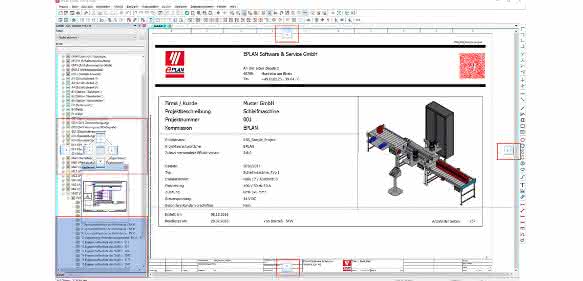
The user interface already offers a great deal of convenience thanks to design options and individual views of the project data. Now, entire windows of navigators or data dialogs, for example, can be hidden as flyouts at the edge of the main window. This makes working in the project clearer. The tooltips have also been expanded. Additional important information from the status bar is displayed below the buttons in the toolbars.
Users can also mark projects that are open in parallel with different background colors, preventing them from accidentally editing the wrong project. Additional navigators, such as a second page navigator, can also be displayed, allowing users to view different project sections in parallel.
There are also enhancements in the macros area. First and foremost is the display of macros in circuit diagram projects. This allows designers to quickly and easily identify window and symbol macros in a project. In addition, macros with extended settings can be updated more easily. The now possible integration of placeholder objects in the Macro Navigator also ensures quick identification and editing. as


You might also be interested in
Die Plattform wächst
Bei Eplan steht die Plattform 2.7 im Mittelpunkt, die seit September verfügbar ist. Alle Informationen entlang der Wertschöpfungskette lassen sich im Engineering-Prozess anreichern. Zur SPS IPC Drives folgt ein nächstes Update im Portal, das die...
 read more...
Simply in good hands
The organization of workwear for the team usually also includes lockers, waste bins and, above all, locker systems. DBL offers solutions here. A look into practice.
read more...Logimat 2025: Gripping and lifting
Even more ergonomics in intralogistics
At vacuum expert Schmalz, trade fair visitors can experience grippers and lifting aids for picking and moving various goods and components.
read more...Relief for the back
More and more companies are realizing this: Exoskeletons make jobs more attractive and help to attract and retain skilled workers.
read more...Exoskeletons in industrial workplaces
To what extent can exoskeletons relieve employees and which exoskeletons are suitable for what? These questions are answered by a working group at the University of Innsbruck.
read more...Working more easily with the S700 exoskeleton
More strength, less load. With the S700 active shoulder exoskeleton, activities above the head and at chest height are demonstrably and noticeably easier. The exoskeleton can also be individually adapted to the user. The S700 offers prevention...
read more...Welding solutions in the name of resource efficiency
At the Welding & Cutting trade fair in Essen (September 11-15), Fronius will be focusing on the major drivers in welding technology. Quality requirements are increasing in all industries, but the required welding specialists are scarce. In...
read more...E-scooter with customizable damping
The startup Scuddy has significantly improved the flexibility, performance, customizability and ergonomics of its second-generation foldable e-scooter of the same name - thanks in part to damping technology from ACE.
read more...The active shoulder exoskeleton S700 from exoIQ
The advantage of an active exoskeleton is obvious. Like passive systems, they transfer the load from weaker to stronger parts of the body. Following intensive biomechanical analyses, the Hamburg-based company exoIQ has developed an active...
read more...