
Workplace design
Who, how and for what?
The design of an ergonomically optimized workstation that protects the health of the employee and at the same time can be used flexibly and optimally in production, requires a close look at the topic. Who should do what, where and how often, and how much should it all cost?
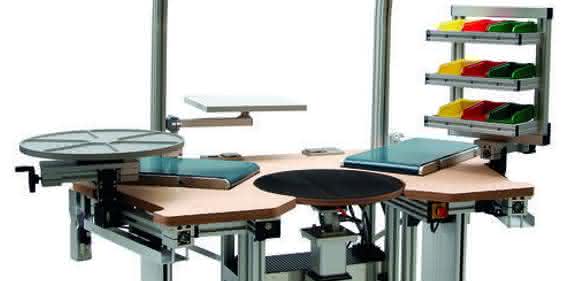
Not all workstations are the same. Depending on the activity, each workstation has its own requirements. When designing an ergonomic (assembly) workstation, the question of the benefits for the employee, the task to be performed and the company should be the top priority. In this context, it can be useful to first ask yourself the following six basic questions: Where is the workplace located? Who works there? What or what work does the employee do at the workplace? How often do the various work processes and operations take place? What budget is available for the workplace?
"If the designer is able to answer these questions, he already has a pretty good requirements profile. In addition, it always makes sense to ask the employees on site," says Michael Amon, Head of Technology at RK Rose+Krieger. The company specializes in linear, profile and connection technology and, together with partner companies, offers technologies that are required for the design of ergonomic workstations according to lean criteria.
Who?
It is important to clarify whether only one person works at a time at the workstation to be set up or whether it needs to be designed so that several people can carry out their tasks. If different employees need to be able to work at it, it should be considered whether the workstation can be adapted to the respective height of the person and the associated reach distances and table height. This can be achieved, for example, by adjusting the height of the worktable using electrically movable lifting columns and by adjusting the reach using electrically driven linear systems.
What kind of work?
A key aspect in the design of an ergonomic workstation is the type of tasks to be carried out. Are they physically demanding? Are the employees increasingly required to perform one-sided tasks? Here, the strain can at least be minimized, if not completely eliminated, with the help of appropriate ergonomic measures.
In addition to height adjustment for optimum adaptation of the workstation to the person's height, assembly support systems are also available for this purpose. They help, for example, to turn the workpiece or to bring the area to be worked on into a position that is easy on the joints. When assembling heavy workpieces, crane or lift trucks help to place the load on the assembly device or workstation. However, the work table itself must also be designed to withstand the high load dynamics.
The situation is different when processing packages with different dimensions - here a workstation is required that can be adapted very quickly to the package height in order to protect the employee. High-end systems for assembly support are even able to recognize the user and then adjust both the vertical working height and the horizontal and vertical material supply to the person. Even tool handling can be fully automated. If safety-relevant components are assembled, the workstation should also be equipped with acknowledgement systems in addition to user recognition.
How often?
An assembly support system is certainly useful if products with a high number of variants and infrequent repetitions are manufactured at the workstation. Such a system can guarantee reliable productivity in conjunction with appropriate parts management or supplementary projector or sensor-supported assembly aids. In addition, the employees take turns at such a workstation in an appropriate rotation, preventing one-sided strain. At the same time, appropriate sensor technology and suitable parts management ensure a consistently high level of quality, independent of the employee. Mass or series production workstations in a production cell are subject to different requirements. When designing them, it is important to consider the key criteria such as quantities, variety of variants, processing times, frequencies and other special features.
What budget?
As in many other areas of everyday life, the same applies to the construction of workstations: Cheap can be very expensive in the long run. Workstations that have been designed without any consideration of ergonomic conditions and do not cost much can cause long-term damage to employees' health and thus lead to long periods of absence. On the other hand, seemingly cost-intensive workstations that have been designed to meet ergonomic requirements turn out to be the more cost-effective solution in the long term. This is because they protect employees, reduce absenteeism in the long term and thus save money in the long term.
Design of the workplace
You can buy a simple packing table or a low-budget workstation anywhere. However, complex, ergonomic workstations that follow the lean approach require more in-depth considerations and individual production. With Lean Solution, RK Rose+Krieger offers advice and a comprehensive modular system for the design of individual, ergonomic and waste-free workstations, including the associated environment for transportation and storage.
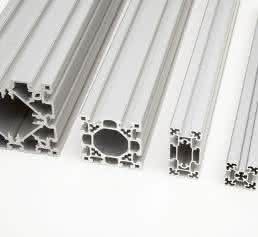
The modular system includes electrically adjustable lifting columns for adjusting the height of the work table as well as aluminum profiles and tube connectors for creating modular assembly units consisting of mobile material trolleys, flow racks or workstations that can be rotated, swiveled and adjusted in height. They allow individual design to meet the requirements of different production processes and the implementation of customer-specific solutions. The central idea behind this system is the elimination of wasted material, time and therefore money, the reduction of ancillary activities and the optimization of value-adding processes. As a result, space requirements, stock levels, throughput times, transport movements and overall costs are reduced. In turn, flexibility, quality, productivity and customer and employee satisfaction increase.
BerndKlöpper/as


You might also be interested in
Plagiarius 2024 negative prize
On January 26, 2024, the Plagiarius campaign awarded its dreaded "Plagiarius" negative prize for the 48th time to manufacturers and retailers of particularly brazen counterfeits and fakes.
 read more...
Ivalua honors winners of the Generative AI...
AI-supported "add-ons" for buyers within 48 hours
Ivalua, provider of cloud-based spend management solutions, announced the winners and innovations of the first Generative AI Innovation Cup. The competition took place in December 2023. It was open to all Ivalua partners and employees - more than...
read more...Efaflex celebrates 50 years of high-speed...
The emphasis is on "fast"
Since day one, Efaflex has wanted to use new technologies as early as possible and drive progress in the industry. This year, the family business is celebrating its 50th anniversary under the motto "Fast Forward".
read more...Security of supply even during power outages
In the winter of 2022, Germany was worried about energy shortages. The drugstore retailer dm did not paint any horror scenarios, but nevertheless saw the possibility of controlled, temporary, regional power cuts (brownouts).
read more...Safety technology in mechanical engineering
Modules with new functions
Euchner's product highlights at EMO 2023 include the communication-capable solenoid interlocks.
read more...Transforming the paper industry towards climate neutrality
Together with partners from industry and research, Voith is developing a project for the optimization of energy and material flows in paper production. The aim of the research project is to develop a digital framework that enables effective process...
read more...Up to 95 percent less flue gas thanks to direct extraction
The requirements for occupational safety measures and safety technology are also constantly increasing in welding technology. The Technical Rules for Hazardous Substances (TRGS) stipulate that welding fumes and harmful substances must be extracted...
read more...Competitive advantages with large machines
Whether 3D-printed components for machines and systems, prototypes or aids for design: additive manufacturing is almost indispensable for modern companies in mechanical and plant engineering and automation if they want to play in the premier league.
read more...Transport technology from the modular system
Many transport tasks can be realized with the help of linear technology. Pre-configured solutions are available to simplify the interaction between the linear unit, motor, gearbox and controller. This minimizes the effort required for research and...
read more...