
IT Solutions
Developer tools for WMR and HoloLens
With the release of the SPP Unitypackag, CAD Software Solutions is rounding off the Spare Parts Place Toolkit. This means that the lean and high-performance SPP file format is also available to developers for HoloLens and WMR apps (Windows Mixed Reality).
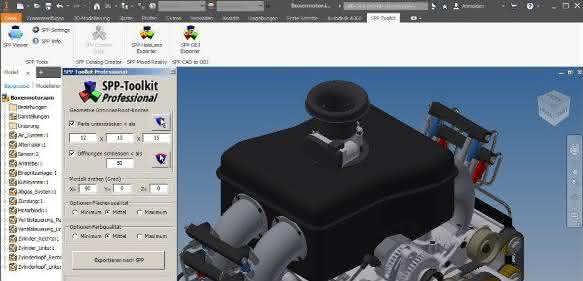
The Spare Parts Place Toolkit for Autodesk Inventor is a tool for simplifying CAD data for use in cloud and mobile applications. The tool offers all the necessary functions to simplify and restructure the geometries of large CAD assemblies with just a few mouse clicks. This means that even assemblies consisting of well over 10,000 individual parts can be loaded, rendered and moved in web and mobile applications with the highest quality and performance.
The data generated in this way represents a ready-to-use 3D spare parts catalog, whereby each customer hosts the data generated by the Spare Parts Place Toolkit on their own server and thus retains control over their data. For end customers in the spare parts business, CAD Software Solutions offers access to the catalogs with the Spare Parts Place Viewer (SPPV). SPPV can be integrated into an HTML website and is available as an app and as a desktop EXE.
The package now also includes a revised version of Threejs. This allows the native file format of Spare Parts Place Toolkit to be integrated directly into HTML websites (full-featured native SPP) and displayed in very high performance and quality on more or less all devices with a web browser. In contrast to OBJ, which is also supported by the Spare Parts Place Toolkit, native SPP can be used to navigate through the assembly hierarchy and access the meta data of assemblies/components.
Unity3D, HoloLens and WMR
To round off the possibilities and for the widest possible range of applications, the standard package of Spare Parts Place Toolkit now also includes a Unitypackage for developers. This Unitypackage for the Unity3D development environment enables the quick and easy creation of scenes for Unity3D, WMR and MS HoloLens applications. It provides all the necessary functions to trade the highly compressed SPP 3D CAD data prepared with the SparePartsPlace Toolkit in WMR, MS HoloLens and general Unity3D applications. This collection of tools enables any user to design a scene tailored to their needs within minutes and to link the information and functions provided by the SPP Unitypackage with the application-specific GUI elements or gestures of their own application. The developer thus receives everything necessary for handling the CAD data ready for use.
The SPP Unitypackage includes functions such as
- Access to SPP CAD data (local + cloud)
- Server credentials
- SPP CAD data streaming
- Access to various shaders
- CAD geometry selection (selection handler)
- Access to assembly hierarchy
- Access to meta data (assemblies and individual parts)
- Synchronization of geometry and tree structure selection
- Iteration through the assembly structure
- etc.
The user creates a new scene with the desired/required functions in just a few moments using drag & drop. A video shows how easy and quick it is to create an application with SPP 3D CAD data: http://www.sparepartsplace.com/ms_hololens/
www.sparepartsplace.com


You might also be interested in
ESTIA aims to strengthen Europe's cloud
New tech alliance for EU sovereignty
Twelve companies, including Dassault Systèmes, are founding the European Sovereign Tech Industry Alliance (ESTIA). The initiative aims to strengthen Europe's technological independence and define requirements for sovereign cloud services. The start...
 read more...
Deutsche Telekom and Nvidia launch one of Europe's largest AI factories
With the Industrial AI Cloud in Munich, Deutsche Telekom and NVIDIA are creating one of the largest AI factories in Europe. Companies can train AI models, carry out simulations and access 10,000 GPUs.
read more...Leveraging data potential with AI and streaming
Huge data treasures are still lying dormant in many manufacturing companies. And yet it is high time that these treasures were unlocked. There is often a lack of resources and capacity to make data usable in real time. Streaming production data can...
read more...More awareness of noise
Dematic offers solutions that are tailored to different cloud environments and reduce environmental impact through reduced material consumption and improved energy efficiency.
read more...Generative AI in the automation environment
The mechanical engineering and automation industry is undergoing profound change. This transformation is being driven by more volatile global trade, geopolitical crises and increasing market pressure, which demands greater agility, technological...
read more...Rigid data structures have had their day
The traditional data center is no longer the center of data. A hybrid cloud storage approach enables manufacturing companies to both meet the current requirements of data-intensive processes and future-proof their infrastructure.
read more...Software as a service in three stages
CIM Database Cloud is a new out-of-the-box solution from Contact for end-to-end digital product development.
read more...How production can benefit from AI
Together with AI technology, IIoT networking makes it possible to better control machine parameters and optimize quality with predictive quality. Downtimes and set-up times can also be further minimized. Cloud platforms also make these technologies...
read more...More expertise for digital engineering
Altair, a computational science and artificial intelligence (AI) company, has acquired OmniV, a technology from Michigan, USA-based software company XLDyn.
read more...