
Software
Designing without a CAD program
Item wants to prove with its engineering tool that extensive CAD software is not necessary for design tasks.
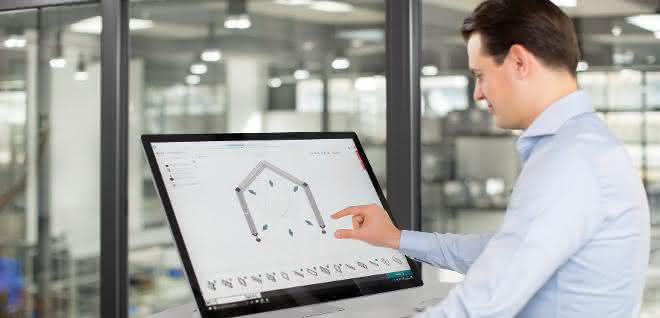
Is CAD the ultimate in design? When it comes to designing individual products and free design in conjunction with maximum flexibility, the answer to this question is a clear yes. There are various CAD programs that are specially tailored to individual industries and their requirements. However, the use of CAD systems is often associated with high investment costs and the software is very complex. There are therefore alternatives for designing equipment that are easier to use and more cost-effective.
Simple operation
Extensive training is usually required to enable employees to use traditional CAD systems. If software updates are required, further training is often necessary. There is also an enormous administrative IT effort. In contrast, item's engineering tool does not require detailed specialist knowledge - the steps for designing simple basic frames are quickly learned. The digital tool makes it much easier to design operating equipment. It is intuitive to use and offers a large work surface that can be used to design online in 3D. Users can access the product catalog of the item MB Building Kit System and Lean Production Building Kit System to realize their projects.
Base frames created quickly
The properties for the individual components of the construction can be defined easily and conveniently and changed at any time. The appropriate connection technology and matching accessories are quickly selected. In this way, simple frames can be created in no time at all. CAD systems are often oversized, especially for simple designs in equipment construction. For example, if a designer wants to create a design from item components in the CAD system, they have to load the individual products into their system and add the corresponding metadata, such as supplier or article number.
The designer then creates links to determine the position of the products in three-dimensional space. This process must be repeated for each profile and all connections. This is laborious and time-consuming. Connection processes such as drill holes and threads are often not defined due to time constraints. The item Engineeringtool, on the other hand, automatically inserts drill holes and necessary profile processing and positions them to suit the connector in question.
Simply share results
The item engineering tool is free of charge and can be used without a license. CAD programs, on the other hand, are expensive; licenses are often tied to computers and must be renewed in good time. Another economic advantage of item software is the integrated data management. CAD systems often only offer limited options for saving and retrieving CAD data, with the exception of Windows Explorer. Otherwise, a product data management system is necessary, with the associated acquisition and maintenance costs. The engineering tool is based on the latest web technology and works without installation, plug-in or app.
The intelligent software can be used on any PC, smartphone or tablet. In contrast, CAD systems are usually limited to workstations. In order to display results on other end devices, such as a cell phone, complex conversion steps have to be carried out. The design results can also only be distributed and shared with colleagues and partners via additional systems, such as a CAD viewer, or manually exported STEP data.
Project documentation
In the CAD system, the user must manually create the views, sections and details required for the drawing derivation. They also enter dimensions, tolerances and other information such as the position and size of the machining operations manually. The parts list often has to be prepared separately. "A processing time of two hours or more is not unusual to create a drawing with dimensions, the parts list and the processing plan," says Christian Thiel, Product Manager and expert for online tools at item. "This time can be used more sensibly - namely for the pure design process." The convenient and time-saving project documentation is a major advantage of the item engineering tool. At the touch of a button, the intelligent software creates a parts list and a detailed processing plan, a three-panel projection, an isometric representation with complete dimensions, an exploded view and assembly instructions that explain the structure of the design step by step.
CAD system and engineering tool
CAD systems and the item Engineering Tool can be ideally combined for certain workflows. For example, if products from other suppliers are to be linked with item components, the item Engineering Tool can initially be used as a basis. In this case, the designer simply transfers the design to his familiar CAD environment.
For this purpose, 15 neutral data formats, such as SAT, STEP and IGES, as well as direct insertion drivers for 28 CAD systems in various versions are available for the designs in the engineering tool, as well as for all other 400 item articles. Users download the neutral data via the CAD Download Center and import it into their CAD system in order to work with it. An additional data export option is available via the "Insert directly" function in the item Engineering tool. The design is imported directly into the CAD system without intermediate storage.
Metadata such as the project name is transferred directly. "This option is reserved for registered users," says Christian Thiel. "This export option saves you time, as there is no need to go through the Download Center and import manually."
Fast construction
In special machine construction, designs are created from components from different manufacturers. Designs often have to be adapted to new requirements. The item Engineeringtool is perfect for creating an initial draft that can be used for further work in the CAD system. Constantly switching between item Engineeringtool and the CAD system is not expedient, as too many links would have to be adapted for every change, no matter how small.
"We are constantly expanding the item engineering tool," explains Christian Thiel. "In the near future, we will also be adding components and functions for special machine construction to the software." A first small step has been taken with a fixed coordinate system at the origin of the design. This can save a lot of time when re-importing. The current focus of the item engineering tool is on speeding up the design process for operating equipment. The market leader in the field of modular systems for industrial applications is thus enabling efficient process design. The result is a digital workplace for all design tasks involving item components.
"From my point of view, both systems - CAD and item Engineeringtool - have their raison d'être," states Christian Thiel. "While the item Engineeringtool makes it easier to create basic designs, the CAD system excels when it comes to individuality and free design." The simple export of data from the item Engineeringtool to CAD systems opens up completely new possibilities for designers. This allows them to combine the advantages of the item Engineeringtool with the benefits of CAD systems and thus benefit twice over.
All products designed in the item engineering tool are given a globally unique project number. This makes it easy to share the design result with colleagues, cooperation partners and customers by e-mail - no additional IT solution is required. Short delivery times and the high availability of components from the item Engineeringtool enable designs to be implemented quickly. Stock levels can therefore be reduced and warehousing costs lowered


You might also be interested in
Predictive maintenance in retrofit
Predictive maintenance pays off. This is because early detection of impending failures means that systems can be serviced in a targeted manner before production downtime occurs. But how complex is it to integrate such a maintenance concept into an...
 read more...
Maintenance instead of replacement
The circular economy starts with the machinery
Sustainability in industry starts with machines, says our guest author from Deguma: How maintenance, modernization and the 5R strategy save resources, energy and CO₂.
read more...3D printing for unplanned requirements
The material fails and the machine suddenly stops? Then you need to take the right measures to be able to resume production quickly. Material failure in the form of faulty components or material wear in the frame are a risk for any production.
read more...High demands in terms of safety, application and robustness
Demanding work in the electrical trade and energy supply as well as smooth processes in production require innovative and customized measurement technology that scores points for safety, ease of use and resilience.
read more...Car meets e-bike: riding with lubrication-free polymer bearings
Studies show that the proportion of pedestrian and bicycle traffic is increasing in urban areas. With the JetBike, JetBike GmbH from Braunschweig presents a mixture of e-bike and car and relies on lubrication-free polymer bearings from Igus.
read more...Hydraulic hub for more efficient servicing
Bosch Rexroth presents a digital toolbox for service and maintenance. With a comprehensive range of digital services, the Hydraulic Hub simplifies and accelerates the service and maintenance of hydraulic products and increases machine availability.
read more...Arnold Umformtechnik expands after-sales...
Faster help with VR glasses
Arnold Umformtechnik is expanding the after-sales service for its machines to include digital remote services. The focus is on data security, simple operation and clear processes.
read more...147,000 euros per hour: high costs for German companies due to unplanned downtime
According to the "Value of Reliability" study, 67% of industrial companies in Germany experience unplanned downtime at least once a month. This costs the German economy 147,000 euros per hour. Nevertheless, reactive maintenance concepts are not...
read more...Maintenance starts with a maintenance planner
Legal requirements stipulate that machines and systems must be serviced regularly. The maintenance work serves to ensure occupational safety and economic efficiency.
read more...