
Simatic MindApps
Monitoring all along the line
Apps for cloud-based automation services. Siemens is presenting new apps for automation with Simatic systems. The Mind apps Machine Monitor, Notifier and Performance Monitor are special applications for Mindsphere, the open IoT operating system from Siemens, with which users can take advantage of cloud-based services.
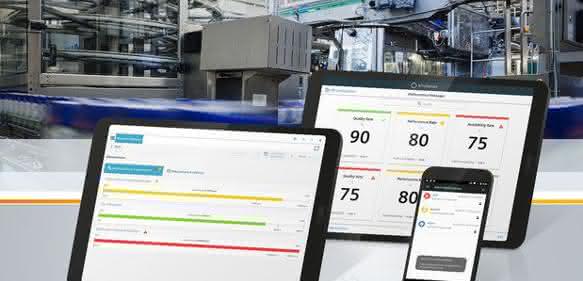
The new Simatic Machine Monitor Mind app creates transparency about the status and performance of machines and makes it possible to optimize services. The Machine Monitor monitors the operating and maintenance status of machines in terms of productivity, maintenance and availability. The user uses the Simatic Notifier Mind app to visualize messages, for example if the KPIs (Key Performance Indicator) of a machine to be monitored are not met, and also offers location-independent access to alarm data. The app allows messages from different systems and sources, for example from a Scada system or other Simatic Mind apps, to be summarized centrally worldwide and alarms to be sent in a targeted manner, for example individually to the mobile device of the responsible service technician. With specially definable views, access to alarms and messages can be individually tailored to the respective user and alarms can be filtered according to specific criteria, for example.
Improved availability and productivity of production facilities through greater transparency is the focus of the Performance Monitor Mind app. By calculating and visualizing machine and system KPIs, the app provides users with decision-making aids for optimizing machines and systems and thus increasing their efficiency. KPIs can be defined and calculated, visualized and analyzed, including historical data, and alarm thresholds and user-dependent cockpit views can be defined.
Already available are the Mind apps Fleet Manager and Visual Analyzer, which help users to connect their machines and systems to Mindsphere, configure them and read out and visualize the data relevant for the analysis. pb
Hall 9, Stand D35


You might also be interested in
Predictive maintenance in retrofit
Predictive maintenance pays off. This is because early detection of impending failures means that systems can be serviced in a targeted manner before production downtime occurs. But how complex is it to integrate such a maintenance concept into an...
 read more...
Maintenance instead of replacement
The circular economy starts with the machinery
Sustainability in industry starts with machines, says our guest author from Deguma: How maintenance, modernization and the 5R strategy save resources, energy and CO₂.
read more...3D printing for unplanned requirements
The material fails and the machine suddenly stops? Then you need to take the right measures to be able to resume production quickly. Material failure in the form of faulty components or material wear in the frame are a risk for any production.
read more...High demands in terms of safety, application and robustness
Demanding work in the electrical trade and energy supply as well as smooth processes in production require innovative and customized measurement technology that scores points for safety, ease of use and resilience.
read more...Car meets e-bike: riding with lubrication-free polymer bearings
Studies show that the proportion of pedestrian and bicycle traffic is increasing in urban areas. With the JetBike, JetBike GmbH from Braunschweig presents a mixture of e-bike and car and relies on lubrication-free polymer bearings from Igus.
read more...Hydraulic hub for more efficient servicing
Bosch Rexroth presents a digital toolbox for service and maintenance. With a comprehensive range of digital services, the Hydraulic Hub simplifies and accelerates the service and maintenance of hydraulic products and increases machine availability.
read more...Arnold Umformtechnik expands after-sales...
Faster help with VR glasses
Arnold Umformtechnik is expanding the after-sales service for its machines to include digital remote services. The focus is on data security, simple operation and clear processes.
read more...147,000 euros per hour: high costs for German companies due to unplanned downtime
According to the "Value of Reliability" study, 67% of industrial companies in Germany experience unplanned downtime at least once a month. This costs the German economy 147,000 euros per hour. Nevertheless, reactive maintenance concepts are not...
read more...Maintenance starts with a maintenance planner
Legal requirements stipulate that machines and systems must be serviced regularly. The maintenance work serves to ensure occupational safety and economic efficiency.
read more...